Securing apache and znc with letsencrypt
This stuff is hard
A couple month's back I was invited to the letsencrypt beta and tried to get ssl working on my static sites being hosted by apache. I failed miserably... ssl is hard 😡.
Let's try again
Today I decided to give it another go as things are out of beta. Despite a few system related hiccups the experience was awesome!
To start I followed the getting started instructions on the letsencrypt website.
$ git clone https://github.com/letsencrypt/letsencrypt
$ cd letsencrypt
$ ./letsencrypt-auto --help
Everything just worked! My system was bootstrapped with all the things I needed to make some ssl certs. 🎉
An edge case
The server I was working with is running Debian Wheezy and my web content is all hosted using apache. Thankfully letsencrypt comes with a super helpful apache plugin! All you need to do to get ssl running with apache is:
$ ./letsencrypt-auto --apache
Checking for new version...
Requesting root privileges to run letsencrypt...
   sudo /home/MylesBorins/.local/share/letsencrypt/bin/letsencrypt --apache
The apache plugin is not working; there may be problems with your existing configuration.
The error was: NotSupportedError('Apache plugin support requires libaugeas0 and augeas-lenses version 1.2.0 or higher, please make sure you have you have those installed.',)
Dat Backport
That is bad! What should I do if the version of dependencies shipped with debian are too old? The answer is to start using debian backports. Debian offers backport debian repositories that you can add to your sources.list. Once added you will be able to manually install specific packages at a later version that what is in the default repository. You can find instructions on setting up backports on the debian website, below are the exact commands I ran.
⚠️WARNING⚠️
The following steps involve modifying your apt
sources.list, only do so if you know what you are doing!
⚠️WARNING⚠️
$ sudo echo "deb http://ftp.debian.org/debian wheezy-backports main" | sudo tee -a /etc/apt/sources.list
$ sudo apt-get update
$ sudo apt-get install -t wheezy-backports libaugeas0 augeas-lenses
Up and running
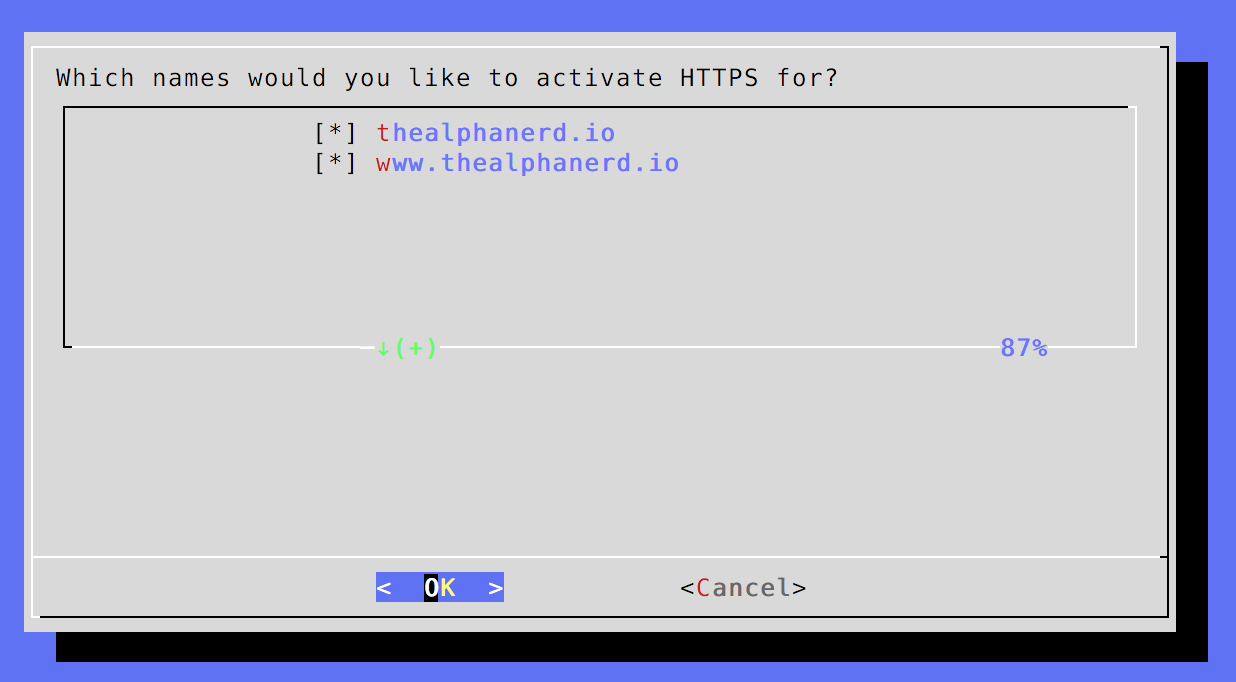
Now that we have the updated version of libaugeas0 and augeas-lenses we simply rerun the original command ./letsencrypt-auto --apache and the entire process of setting up SSL for https is automated. you are even given a UI that you can use to select which sites to grab certs for
Keeping things up to date
It turns out letsencrypt expires certs after 90 days. In order to make sure our sites don't use expired certs we need to set up a cron job that will regularily update the certs. Following the instructions on the website I created this update-cert shell script.
#!/bin/sh
if ! /path/to/letsencrypt/letsencrypt-auto renew > /var/log/letsencrypt/renew.log 2>&1 ; then
  echo Automated renewal failed:
  cat /var/log/letsencrypt/renew.log
  exit 1
fi
I placed the script into /etc/cron.daily/update-certs, and just let cron take care of the rest. If you are making a new file don't forget to chown it to 755.
Going the extra mile
Just over a year ago I decided to start using znc as an irc bouncer. When using an irc bouncer you connect your irc client to the bouncer, and the bouncer connects to the irc server. When you are disconnected the bouncer maintains a connection with the irc server, and when you reconnect to the bounceryou are sent all the messages you missed. Getting a bouncer up and going on digital ocean was beyond easy due to the existance of a docker container for znc. After creating a docker droplet on digital ocean I got a bouncer up and running with this single command.
docker run -d -p 36667:6667 -p 36669:6669 -v $HOME/.znc:/znc-data --name znc jimeh/zncOnce the znc server is running you can connect to it via http to setup the config and get your things set up. Mostly everything was intuitive, except for setting up SSL. This is kind of a big deal. While you are able to easily set up an SSL connection between znc and your irc server, if you do not have SSL setup on your bouncer you will be sending it traffic in plain text. This is really bad, especially if you are using irc on a public network, which you likely are.
Hide Yo Packets
So now that letsencrypt has been out for a couple months the znc wiki has updated with instructions on how you can easily setup a cert. Their instruction are however missing the first step, which is generating your cert.
$ ./letsencrypt-auto certonly --standalone -d mysite.wowOnce the cert is generated we want to create the pem file that znc will use
$ cat /etc/letsencrypt/live/mysite.wow/{privkey,cert,chain}.pem > ~/.znc/znc.pemWe will then have to restart znc
docker restart zncYou will then want to connect to the web based admin panel, click on global settings, and make a new listen port on 6669 that has ssl enabled.
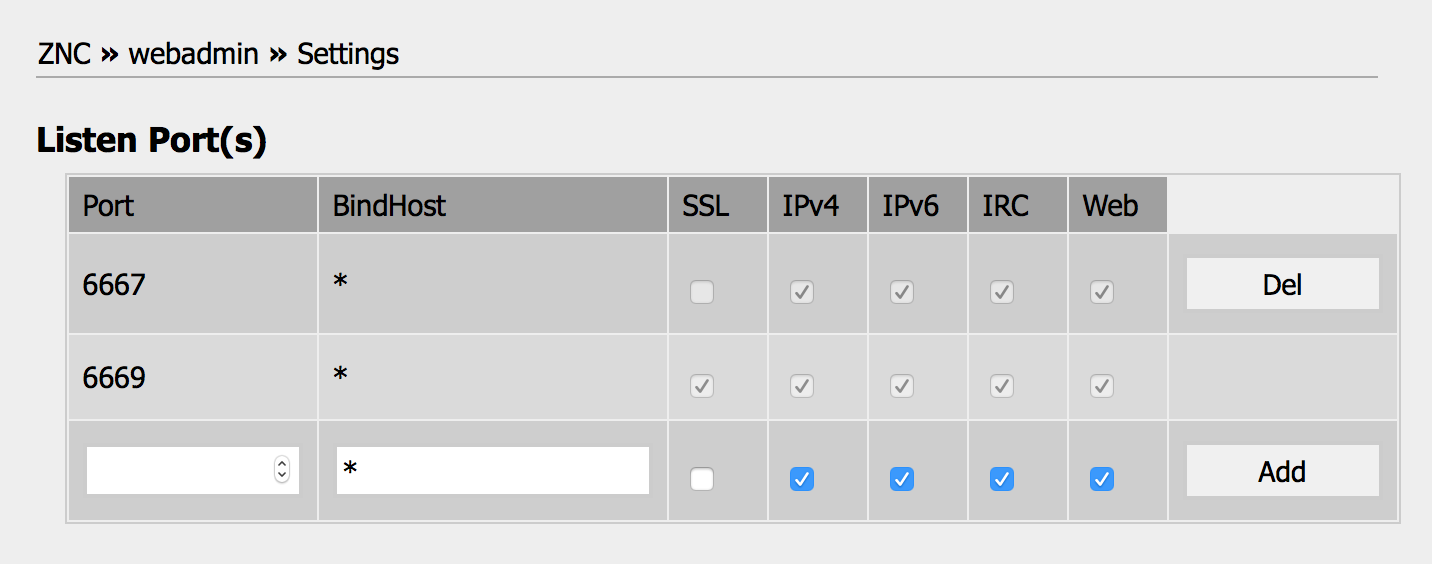
Once this port is enabled you will be able to connect to your server at port 36669 and start chatting securely!
Keeping things up to date
You will need to create a cronjob to keep your irc cert up to date as well. Below is the bash script that I used
#!/bin/bash
~/letsencrypt/letsencrypt-auto renew -nvv --standalone > /var/log/letsencrypt/renew.log 2>&1
LE_STATUS=$?
if [ "$LE_STATUS" != 0 ]; then
    echo Automated renewal failed:
    cat /var/log/letsencrypt/renew.log
    exit 1
fi
cat /etc/letsencrypt/live/mysite.wow/{privkey,cert,chain}.pem > ~/.znc/znc.pem
docker restart znc
echo Automated renewal worked!
I placed this file in /etc/cron.daily/ and now I will most likely not have to worry about this again.
Parting words
SSL scared me. The first time I tried to do this I had no idea what to do, nothing worked, and it didn't feel really great. I continued using my bouncer in an insecure way, avoiding taking care of this problem because it was so hard for me. After seeing how far letsencrypt has come in the last couple months I am elated. I am no longer afraid of setting up SSL, and I am fairly confident that I will be able to do so without much pain with future services.